
Resource Database Development Policy
The Resource Database Development Policy provides directives on managing resources that will be included or excluded from the database as defined by the Inclusion Plan. In addition, it provides detailed descriptions on how resources will be identified based on service indexing, what data elements will be included, and how such data elements will appear in the database. This policy also provides guidance on the required resource review and update to further ensure that the most valid and applicable information is being delivered to the community.
Last reviewed: 7/28/2025
SECTION 1 – INTRODUCTION
The purpose of this policy is to provide clear and concise guidance to the persons trained to update resources to support the mission of the DuPage County resource database. The mission is to provide a trustworthy and comprehensive basic needs resource database to DuPage County residents and agencies using current best practices to meet the individual and organizational ‘resource database’ needs in the community. The resource database increases community capacity by eliminating duplicative resource collection, providing a self-guided database to connect those to the resources, and provides data on community needs to inform system planners and policy makers.
The Resource Database Development Policy provides directives on managing resources that will be included or excluded from the database as defined by the Inclusion Plan. In addition, it provides detailed descriptions on how resources will be identified based on service indexing, what data elements will be included, and how such data elements will appear in the database. This policy also provides guidance on the required resource review and update to further ensure that the most valid and applicable information is being delivered to the community.
This policy shall be maintained by the Intake and Referral Unit and reviewed annually, where changes are to be submitted to the Director of Community Services for approval.
The resource database is hosted in the Northeast IL (NIL) Homeless Management Information System (HMIS) where the Alliance to End Homelessness in Suburban Cook County is the NIL technical lead and DuPage County Community Services is the HMIS Lead for the DuPage County Continuum of Care (CoC). HMIS has its own criteria for managing project and client level data that will not always align with the resource database criteria. HMIS System Administrators and the Resource Specialists will work together to determine best practices where records overlap. At this time, the Alliance is entering limited resource data in the shared environment that is not expected to meet the standards listed in this policy. Call Specialists will be trained to include location filters when looking up resources to help ensure the most appropriate search results.
SECTION 2 – INCLUSION PLAN
The resource database is designed to be a comprehensive resource database. Any organization or entity meeting the Inclusion criteria may be incorporated. The focus of the database is on free or low-cost services offered to persons located in DuPage County where the services meet either an essential human or economic need. Areas targeted include clothing and household goods, education, employment, income and financial resources, individual and family support, legal aid, food, health (dental, medical, mental), housing and utilities, and transportation. Agencies and services must meet all criteria, as explicitly stated within the Inclusion Plan, to be included in the resource database.
Disclaimer
Organizations appearing in the resource database have entered into either a verbal or written partnership agreement with DuPage County Community Services to provide accurate information about primary services they offer. They will delegate a resource contact to work with staff at DuPage County Community Services to routinely review and provide updated information on their provider record and program records, including descriptions, hours, eligibility, intake, required documents and fees. These organizations agree to review their resource record(s) annually, notifying DuPage County either through the online resource record, 211dupage.gov, or by emailing, [email protected], of any changes needed or to confirm that the data is accurate as it appears. They may affirm this partnership by completing a Memorandum of Understanding each year and submitting it to [email protected].
DuPage County Community Services does not guarantee referrals or services by any organization listed in our resource directory. Each organization is responsible for screening clients referred to them by 211 for their program or service.
Inclusion in the resource database should not be construed to constitute an endorsement of an agency, organization, or its services, nor should exclusion be construed to constitute disapproval. The resource database provides information, not endorsements, recommendations, or ratings of potential service providers.
DuPage County Community Services reserves the right to edit, delete, or decide whether to publish any information in its resource directory, and can do this without needing permission from the organizations listed, to meet legal, standard, stylistic, and space requirements. Inclusion in the database is determined by the degree of demand or need for the services offered in each community.
Geographic Area
Agencies to be included within this database must provide services that meet an essential human or economic need to those located within DuPage County, Illinois, or are providing 211/Information and Referral services in the State of Illinois.
Inclusion Criteria
A nonprofit or Government organization providing free or low-cost services must meet the following criteria to be included in the resource database:
- The location of the organization is not zoned as residential in any state or country.
- The organization has been in business for more than one year.
- The organization is registered and active or in good standing with the State of Illinois or the state where they are headquartered.
- The service is free or offered at a low cost.
- The service does not require a referral from a third party and can be applied/registered for directly by those who are eligible.
- The service meets an essential human or economic need for those in DuPage County as identified in our community’s needs assessment and reporting.
- The resource isn’t sufficiently covered in the database.
- Proof of accreditation, licensure, and/or certification is available when required.
- Contact information is readily available on the organization’s website and social media channels.
- The organization provides complete information and confirms the accuracy of the information annually.
For-profit businesses may be considered if there is a community need for the service and if they meet the inclusion criteria listed above in addition to the following criteria:
- The service must be free, have a sliding fee scale, or accept payments from government or nonprofit organizations.
- Additionally, the service must be in DuPage County and meet at least one of the following:
- Be an accredited college or university.
- Services are dedicated to serving older adults.
- The service addresses a unique human service need identified in the community needs assessment that is not otherwise available from a nonprofit provider.
Exclusion/Removal Criteria
DuPage County Community Services reserves the right to exclude organizations from the resource database that do not meet the inclusion criteria as explicitly stated within the Inclusion Plan.
Potential grounds for exclusion or removal from the database may include, but are not limited to:
- The organization or service does not meet inclusion criteria.
- The organization has not responded to the annual request to verify the accuracy of their data.
- Services are for members only.
- The service is sufficiently covered through other resources already included in the database. Examples include:
- Subsidized housing listings through the Housing and Urban Development (HUD)
- Childcare provider listings through the YWCA
- Elementary and secondary public and private schools through the Regional Office of Education
- Home Health Care providers through Medicare.gov
- There is no longer a documented need for the service.
- There are sufficient resources addressing the need in the database, where we will prioritize those resources physically located in DuPage County and that are free or low-cost.
- The organization does not have at least one established service site that clients can physically visit should the service require it.
- The organization does not have at least one staff person that is regularly available to communicate with Information and Referral staff, except for an entity that has reliable and current program information posted publicly.
- Services provided are for a political cause or the organization is an issue-oriented action group.
- The organization has engaged in fraudulent, discriminatory, or illegal activities.
- The organization misrepresented their services in any way.
Other Considerations
The following items will also be considered when determining if a resource will be included:
- The degree of demand/need for the services offered.
- The number of agencies in the database currently offering the service.
Requests for Inclusion
All requests for inclusion may be initiated by completing a 211 DuPage Resource Data Survey, which is posted on the website, 211dupage.gov. Requests may also be emailed to, [email protected]. A staff person will review the request along with any additional information needed to determine if the resource meets the Inclusion criteria. It may take up to 30 days for new requests to be assessed. Once all the information is received and verified by a Resource Specialist, it will take approximately 10 business days to curate and publish a resource listing.
This partnership may be affirmed by completing a Memorandum of Understanding each year and submitting it to [email protected].
Appeal Policy
DuPage County Community Services reserves the right to exclude any organization, program, or service from the database at any time that the organization, program, or service does not meet the criteria as outlined in this plan. Complaints regarding the exclusion, inclusion, description, removal or indexing of an organization or its service(s) may be submitted in writing to the Program Manager. All complaints will be considered in light of the Resource Development Policy. The party filing the complaint will be notified in writing of the final decision and justification thereof.
Any further objection to the decision must be submitted in writing to the Director of Community Services whose determination will be returned to the complainant in writing. All decisions by the Director of Community Services are absolute.
Complaints regarding the delivery of a service to a client should be submitted to the organization or entity that provided or refused to provide the service. DuPage County Community Services should also be informed of complaints so that they may keep the resource database current with only those agencies whose referrals are helpful to the community. If there is an egregious non-delivery of service, fraud, discrimination, or misrepresentation of services, DuPage County Community Services reserves the right to remove the agency from the database.
| Program | Program Manager | Director of Community Services |
| Phone: 630-407-6607 | Phone: 630-407-6462 | Phone: 630-407-6500 |
| E-Mail: [email protected] | E-mail: [email protected] | E-Mail: [email protected] |
| Address: 421 N County Farm Rd., Wheaton, IL 60187 | Address: 421 N County Farm Rd., Wheaton, IL 60187 | Address: 421 N County Farm Rd., Wheaton, IL 60187 |
SECTION 3 – PARITY PROJECT & WEEDING
Parity Project
To further assess both resource coverage and accuracy, Resource Specialists will continuously conduct parity projects on service topics throughout the year. These projects will be targeted based on identified community needs, insufficient resource coverage, and annual formal reviews. Staff will utilize other resource directories, web searches, social media, and other information as identified to complete these projects.
Resource Weeding
On an annual basis, the Senior Research Coordinator may inactivate records that meet the following criteria:
- Resources that no longer meet the inclusion criteria.
- Resources that are not in use by HMIS and are not operational.
- Duplicate Resources.
- Resources for which there were 10 (ten) or fewer views and have been published in the database for at least 12 months.
- Resources that do not have at least one staff person that is regularly available to communicate with the Resource Specialists, except for an entity that has reliable and current program information posted publicly.
Only the Senior Research Coordinator or Program Manager are authorized to inactivate resources. Inactivation of resources may have significant reporting and financial repercussions. An official update will be recorded in the software with an explanation as to why the record is being inactivated.
SECTION 4 – RESOURCE REVIEW AND UPDATE
All resources in the database shall be reviewed and updated by a trained Resource Specialist. A trained Resource Specialist is defined as a person who has completed training by the Program Manager or Senior Research Coordinator and who has been given the authorization to create and edit resource records.
Formal Updates constitute a complete audit of each data element and service, where this information shall be verified by a Resource Specialist to assure accuracy of the data. In addition, the data entry must be completed according to the provided Style Guide. Each resource record must be formally reviewed on an annual basis.
Informal Updates can occur anytime a change is required to reflect updates to incorrect or new data, where the review or update does not meet the criteria for a Formal Update. Once the change is saved, the system will generate the Last Updated Date to reflect the last time this record was reviewed, edited, and saved.
Reporting and Monitoring the resource provider Formal Update is completed through the system’s reporting tool. Report, 1311-Resource Update Monitor, generates a list of all resource providers sorted by their last Official Update date. This report is to be reviewed and acted upon monthly.
Requests for Updates
All requests to update the information appearing in the resource database may be initiated by completing a 211 DuPage Resource Data Survey, which is also posted on the website, 211dupage.gov. Requests may also be emailed to, [email protected]. A staff person will review the request along with any additional information needed to determine if the change can be made or if additional information is required. Once all the information is received and verified by a Resource Specialist, it will typically take no more than 2 business days to make the necessary changes.
We ask that when requesting changes to a resource, please review all the information within the record and any associated records for other changes needed. We require an annual review of the full record by each organization to help maintain accuracy and consistency of the information provided.
Annual Reviews
Each record must be reviewed annually in its entirety to ensure that the information is current and accurate. These reviews are conducted with a designated resource contact at each organization appearing in the resource database. A Resource Specialist will send out an initial request to the resource contact(s) by email with instructions about the review requested.
All requests to update the information appearing in the resource database may be initiated by completing a 211 DuPage Resource Data Survey, which is also posted on the website, 211dupage.gov. Requests may also be emailed to, [email protected].
SECTION 5 – SERVICE INDEXING
All resources in the resource database must be properly indexed using the 211 Human Services Indexing System (HSIS), formerly known as the 211 LA County Taxonomy of Human Services. Only trained Resource Specialists should manage service indexing.
Taxonomy
The taxonomy terms used within this database are adopted from the 211 Human Services Indexing Systems (HSIS) and are updated by the software vendor throughout the year. Taxonomy terms provide a detailed description of the service or organization being classified. These terms are organized in a hierarchy and may include multiple levels, with each level providing more specific and targeted information.
Only primary services will be classified and are indexed to the most appropriate taxonomy term based on the term’s definition compared to that of the service being provided. If the service being classified does not meet all components of the taxonomy definition, another term needs to be identified. At minimum, services must be indexed to at least a level two taxonomy code. In addition, the same type services are to be indexed to the same taxonomy term across all resource providers to help ensure consistency and allow for accurate search results.
At times it is more appropriate to use an organizational term rather than a service term where the public is familiar with the services expected through the organization. Examples of this may include Hospitals, Schools, Libraries, and Community Clinics.
Services may be indexed to multiple terms on the same level, but at no time can be indexed to multiple terms on various levels, also known as “double indexing”. An example of double indexing is using BH-3800 Housing Expense Assistance and BH-3800.7000 Rent Payment Assistance to describe a rental payment assistance program. In this example, BH-3800.7000 would be the more accurate choice to describe this service, for this program is only paying for rental costs and does not cover other forms of housing expenses such as mortgage, motel, or moving costs all covered under the term BH-3800 Housing Expense Assistance.
The Senior Research Coordinator or Program Manager will make final indexing decisions.
Customization of Taxonomy
The Program Manager and Senior Research Coordinator shall identify terms that will not be used in the system through existing reporting and submit a request to the Northeast Illinois HMIS collaborative to inactivate these terms. This initial request is to be completed by 10/31/2024 and reviewed annually thereafter. Taxonomy terms are used not only by 211 DuPage but also by the regional Homeless Management Information System.
Development of new taxonomy terms will not be allowed.
Target terms help refine searches to find resources for specific groups. They should be used sparingly and only when the resources are not for the general population and the group being served isn’t already described in the service term details.
Compound Target Terms
Compound Target terms is the use of more than one target term as it relates to a single service where both terms must be true.
An example of this would be a Transitional Housing program dedicated to females who are between the ages of 18-24. In this case the appropriate service term is “BH-8600 Transitional Housing/Shelter” paired with “YB-9000 Young Adults” and “YS-2000 Females” since there is no matching service term for this specialized population and no single target term that addresses both female and this age group.
If there is more than one population served but both criteria do not need to be met, and there is not a single service or target term addressing the population served, consult with the Project Coordinator and/or Inform USA Networker to review. While this is an uncommon occurrence, our software will not allow the same service code to be added to a single record more than once. For example, food boxes for a Veteran or families of a military Veteran. Only one of the target populations needs to be true, therefore use of compound target terms would not be appropriate in this situation.
Modalities
Modalities can be added to further identify a specific type of setting or delivery of service, as in counseling services. Adding a modality is optional and is only visible to trained users through the Homeless Management Information System (HMIS).
SECTION 6 – DATA ELEMENTS
All data elements of each resource record must be formally reviewed upon creation and on an annual basis. The following data elements are the minimum data requirements to be completed for every resource record. The Senior Research Coordinator will complete a monthly audit of these elements to help ensure compliance.
Provider Profile
- Agency/program name Email
- Also known as (AKA) name for agency/program Name and Title of the Director or Administrator
- Official Update Name, Title, Phone and Email for Resource Contact
- Official update date Website
- Name and Agency Requesting Change Hours and Days of operation
- Change Description Languages
- Description Access for People with Disabilities
- Physical address Available for public site
- Mailing address Available for printed directory
- Contact numbers
Standards Information
- Designation of agency/site
- License/Accreditations
- Legal Status of the agency
- Payment Methods Accepted
- Provider Maintaining
Services
- Geography served Service offered outside of physical location
- Primary services Available for a printed directory
- Description Available for referral
- Hours Available for research
- Eligibility Last verified date
- Intake/Application Process Resource contact information
- Required documents Telephone number(s): Type, Function, Confidential, Toll-Free
- Fees Geography Served
- Languages
Provider Creation
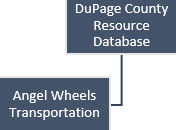
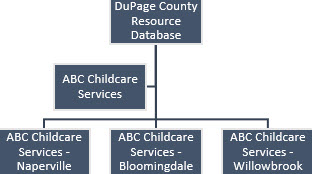
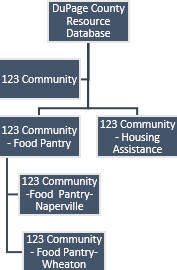
Provider Organizational Structure
| Data Element | Level | HMIS Field Location and Name |
|---|---|---|
| Agency/Organization | Provider Record | Provider Admin – Provider |
| Site | Provider Record | Provider Admin – Provider |
| Program | Provider Record | Provider Admin – Provider |
Description
- If HUD/HMIS or Uses Client Services data element in the Provider record is checked, contact [email protected] before making any changes.
Examples
| Single Site | Multi-Site | Program Records |
|---|---|---|
 |
 |
 |
Agency Name
| Data Element | Level | HMIS Field Location and Name |
|---|---|---|
| Agency Name | Agency | Provider Profile – Provider Name |
Description
- Official name; doing business as.
- Styled as listed publicly, including acronyms and ampersands.
- Omit punctuation from abbreviations.
- Avoid abbreviations when possible.
- Capitalize each significant word.
Examples
- Aurora, City of
- Access from AT&T
- ARK, The
- Carepoint Adult, Child & Family Association
- Call 4 Calm – Mental Health Support Text Line
Site Name
| Data Element | Level | HMIS Field Location and Name |
|---|---|---|
| Site Name | Site | Provider Profile – Provider Name |
Description
- Site records should be listed as ‘Agency Name–Location’.
- If there is more than one site within the same city, use ‘Agency Name–Street Name, City Name’.
- Styled as listed publicly, including acronyms and ampersands.
- Omit punctuation from abbreviations.
- Avoid abbreviations when possible.
- Capitalize each significant word.
- Governmental programs should all be listed uniformly, with the name beginning with the level of jurisdiction.
- If the resource record is also a HMIS record, HMIS System Administrators may opt to shorten the Site/Program name by using an acronym for the Agency Name.
Examples
- Acme Healthcare – Carol Stream
- ABC Counseling – High Street, Aurora
- ABC Counseling – First Avenue, Aurora
- Valley Legal Services – Rickert Library, Naperville
Program Name
| Data Element | Level | HMIS Field Location and Name |
|---|---|---|
| Program Name | Program/Service | Provider Profile – Provider Name |
Description
- Program records are uncommon in this site for we will use Service Terms to name the primary services being offered, and the service details to provide more information on each service. However, if this is a shared record with HMIS, HMIS must use program records to track data by project type.
- HMIS System Administrators may opt to shorten a program record name by using an acronym for the organization name.
- Program records should be listed as ‘Agency Name–Program Name’.
- If there is more than one site for a program, then the name should be listed as ‘Agency Name–Program Name–City Name’.
- Styled as listed publicly, including acronyms and ampersands.
- Omit punctuation from abbreviations.
- Avoid abbreviations when possible.
- Capitalize each significant word.
- Governmental programs should all be listed uniformly, with the name beginning with the level of jurisdiction.
Examples
- Midwest Shelter for Homeless Veterans – Emergency Services
- DuPage County Community Services – Homeless Prevention Program
- OCM-WYO-Jubilee Village
AKA (Also Known As) Name(s)
| Data Element | Level | HMIS Field Location and Name |
|---|---|---|
| AKA (Also Known As) Name(s) | Agency, Site, Program/Service | Provider Profile – Agency/Program (AKA) |
Description
- List names that the agency/site may be commonly known as. This may include alternative spellings, former names, or any alternative which someone may search for this record.
- Avoid use of punctuation, hyphens, and apostrophes.
- Acronyms are accepted if this is what the agency/site may be known by.
- Use commas to separate multiple AKAs.
- If a resource record is also a HMIS record, HMIS will also use other terms in the AKA for HMIS purposes such as project type or funding source.
Examples
| Agency Name | Also Known As (AKA) Examples |
|---|---|
| People’s Resource Center | PRC, Peoples Resource Center |
| DuPage Legal Aid | DuPage Legal Assistance Foundation, DuPage Bar Association |
| Greenpath Financial Wellness | Greenpath, Inc. |
Inform USA Compliant
| Data Element | Level | HMIS Field Location and Name |
|---|---|---|
| Inform USA Compliant | Agency, Site, Program/Service | Provider Profile – [1]AIRS Compliant |
Description
- Select to access specific fields and to designate the record as meeting standards.
Operational
| Data Element | Level | HMIS Field Location and Name |
|---|---|---|
| Record Status (Active/Inactive) | Agency, Site, Program/Service | Provider Profile – Operational |
Description
- Select if agency/program is operational.
- Operational records will appear in the resource database and can be marked to appear on the public website.
[1] The HMIS Field Location and Name reflect current naming conventions in the software and are not reflective of the Inform USA Standards.
Provider Profile
Update History
Add an Update History record for each formal/official and informal/interim update. Update History records will be automatically created for any request submitted through the website that is accepted through the software.
| Data Element | Level | HMIS Field Location and Name |
|---|---|---|
| Official Update | Agency, Site, Program/Service | Update History – Official Update |
Description
- Mark the update as an Official Update = Yes when initially adding a new record and for each annual review.
- Mark the update as Official Update = No for each interim/informal update.
| Data Element | Level | HMIS Field Location and Name |
|---|---|---|
| Date of Last Annual Verification | Agency, Site, Program/Service | Update History – Update Date |
Description
- The Update Date will autofill using the current system date and time in which the Update History record is being created.
| Data Element | Level | HMIS Field Location and Name |
|---|---|---|
| Date of Last Interim Change | Agency, Site, Program/Service | Update History – Update Date |
Description
- The Update Date will autofill using the current system date and time in which the Update History record is being created.
| Data Element | Level | HMIS Field Location and Name |
|---|---|---|
| Resource Database Curator for Last Change | Agency, Site, Program/Service | Update History – Person Making Change and Organization Making Change |
Description
- The HMIS user completing the update and the provider the user is entering the data under will autofill in the Update History record.
| Data Element | Level | HMIS Field Location and Name |
|---|---|---|
| Contact for Last Change | Agency, Site, Program/Service | Update History – Person Requesting Change and Organization Requesting Change |
Description
- List the First and Last name of the person who confirmed the update or status of the record, using proper capitalization.
- If update/change was requested and/or initiated by the Resource Specialist, method of verification must be noted (verified from website, press release, agency newsletter, etc.) in the Change Description.
| Data Element | Level | HMIS Field Location and Name |
|---|---|---|
| Change Description | Agency, Site, Program/Service | Update History – Change Description |
Description
- Summarize the changes made to the record. If this is a new record, this should be noted.
- If update/change was requested and/or initiated by the Resource Specialist, method of verification must be noted (verified from website, press release, agency newsletter, etc.) here.
- If no changes were made during the Formal Update, note this as well.
- Use proper capitalization and punctuation.
Examples
- Verified over the phone: library holiday/extreme weather closure note added. Warming Center temporarily disabled.
- Added executive director to contacts per provider staff autoreply email.
- Verified by phone: added new service term for rental assistance program.
- Updated hours, phone numbers and eligibility per provider website.
- Verified by Resource Data Survey submission: Updated intake process, phone number. Updated service term for counseling program.
- Verified from website and official social media pages: updated Intake Process, removed service term for service/program no longer provided.
Description
| Data Element | Level | HMIS Field Location and Name |
|---|---|---|
| Description | Agency, Site, Program/Service | Provider Profile – Description |
Description
- 1-4 sentences/phrases regarding the agency’s main purpose.
- Short, concise sentencing using simple language, no technical terms or agency jargon.
- Avoid using subjective language such as best, affordable, healthy, fast, etc.
- No acronyms or abbreviations without spelling it out.
- Avoid duplicating information that is already provided in the given data fields.
- Use proper spelling, capitalization, and punctuation.
Examples
- Offers medical and behavioral health, dental, community education, immunizations, refugee health services, health education, Women, Infants & Children (WIC), and a pharmacy.
- Provides programs that serve those who are experiencing homelessness. Programs offered include overnight shelter, meals, supportive services, and housing. Provides food assistance to residents of Addison Township.
- Provides access to medical and prescription expense services for those with low-income and do not have health insurance in DuPage County.
Street/Physical Address(es)
| Data Element | Level | HMIS Field Location and Name |
|---|---|---|
| Address Type | Agency, Site, Program/Service | Location Information – Addresses – Address Type |
Description
- Select Physical for the address type.
- If there is no physical location, such as website listings, then do not enter a physical address.
- If the primary address is outside Illinois and there is no local address for service delivery, mark the primary address as ‘Mailing’.
| Data Element | Level | HMIS Field Location and Name |
|---|---|---|
| Street Address (Address Line 1) | Agency, Site, Program/Service | Location Information – Addresses – Street Address |
Description
- Enter the building or house number followed by the street name for the physical address. Any floor, suite or room number will be entered in the ‘Additional’ field.
- If the physical address is confidential, list ‘Call for Details’.
- If there is no physical location, such as website listings, then do not enter a physical address.
- Avoid use of abbreviations.
- Eliminate use of periods.
- Proper capitalization and spelling.
Examples
- 421 North County Farm Road
- 123 Candy Lane
- 987 Forest Circle
| Data Element | Level | HMIS Field Location and Name |
|---|---|---|
| Address Line 2 | Agency, Site, Program/Service | Location Information – Addresses – Additional |
Description
- Enter a suite or unit number if applicable for the physical address.
- Avoid use of abbreviations.
- Eliminate use of periods and # (use Unit or Suite in place of #).
- Proper capitalization and spelling.
Examples
- Suite A
- Unit 123
| Data Element | Level | HMIS Field Location and Name |
|---|---|---|
| Zip Code | Agency, Site, Program/Service | Location Information – Addresses – Zip Code |
Description
- Enter the Zip code of the physical address.
- Select ‘Apply Zip Code Information’ to auto-populate the City, State, and County data from the United States Postal Service (USPS) database.
| Data Element | Level | HMIS Field Location and Name |
|---|---|---|
| County/Parish | Agency, Site, Program/Service | Location Information – Addresses – County/Parish |
Description
- After entering the Zip Code Information, select ‘Apply Zip Code Information’ to auto-populate the City, State, and County data from the United States Postal Service (USPS) database.
| Data Element | Level | HMIS Field Location and Name |
|---|---|---|
| Area | Not Applicable | Location Information – Addresses – Area |
Description
- We do not use this field for DuPage County resource or HMIS records. Leave this field blank.
| Data Element | Level | HMIS Field Location and Name |
|---|---|---|
| Landmarks | Agency, Site, Program/Service | Location Information – Addresses – Landmarks |
Description
- Add any additional information if needed to help a person locate this address. This field is optional.
- Avoid use of abbreviations.
- Proper capitalization and spelling.
Examples
- Go East on Sidney through the industrial park parking lot. Continue through to the end of the lot. The sign for Serenity House and driveway are at the end of the lot. Follow the driveway and signs to the main entrance.
| Data Element | Level | HMIS Field Location and Name |
|---|---|---|
| Primary Address | Agency, Site, Program/Service | Location Information – Addresses |
Description
- Select this box to signify which Address record is the primary location. However, if there is more than one physical address, there should be separate site records created.
Mailing Address(es)
| Data Element | Level | HMIS Field Location and Name |
|---|---|---|
| Address Type | Agency, Site, Program/Service | Location Information – Addresses – Address Type |
Description
- Select Mailing for the address type.
| Data Element | Level | HMIS Field Location and Name |
|---|---|---|
| Street Address (Address Line 1) | Agency, Site, Program/Service | Location Information – Addresses – Street Address |
Description
- Enter the building or house number followed by the street name for the physical address. Any suite or room number will be entered in the ‘Additional’ field.
- Avoid use of abbreviations.
- Eliminate use of periods.
- Proper capitalization and spelling.
Examples
- 421 North County Farm Road
- 123 Candy Lane
- 987 Forest Circle
| Data Element | Level | HMIS Field Location and Name |
|---|---|---|
| Address Line 2 | Agency, Site, Program/Service | Location Information – Addresses – Additional |
Description
- Enter a suite or unit number if applicable for the physical address.
- Avoid use of abbreviations.
- Eliminate use of periods and # (use Unit or Suite in place of #).
- Proper capitalization and spelling.
Examples
- Suite A
- Unit 123
| Data Element | Level | HMIS Field Location and Name |
|---|---|---|
| Zip Code | Agency, Site, Program/Service | Location Information – Addresses – Zip Code |
Description
- Enter the Zip code of the physical address.
- Select ‘Apply Zip Code Information’ to auto-populate the City, State, and County data from the United States Postal Service (USPS) database.
| Data Element | Level | HMIS Field Location and Name |
|---|---|---|
| County/Parish | Agency, Site, Program/Service | Location Information – Addresses – County/Parish |
Description
- After entering the Zip Code Information, select ‘Apply Zip Code Information’, which will auto-populate the City, State, and County data from the United States Postal Service (USPS) database.
| Data Element | Level | HMIS Field Location and Name |
|---|---|---|
| Area | Not Applicable | Location Information – Addresses – Area |
Description
- We do not use this field for DuPage County resource or HMIS records. Leave this field blank.
| Data Element | Level | HMIS Field Location and Name |
|---|---|---|
| Landmarks | Agency, Site, Program/Service | Location Information – Addresses – Landmarks |
Description
- Leave this field blank for mailing addresses.
| Data Element | Level | HMIS Field Location and Name |
|---|---|---|
| Primary Address | Agency, Site, Program/Service | Location Information – Addresses |
Description
- Select this box to signify which Address record is the primary location. However, if there is more than one physical address, there should be separate site records created.
| Data Element | Level | HMIS Field Location and Name |
|---|---|---|
| Types(s) | Agency, Site, Program/Service | Contact Information – Contact Numbers – Description |
Description
- If no phone number exists, do not create a Contact Number record.
- Provide a concise description for each number to identify the purpose for that number.
Examples
- Main
- Toll-free
- TDD
- Intake
- Text
- Text your zip code to
- Text HELP to
- Fax
| Data Element | Level | HMIS Field Location and Name |
|---|---|---|
| Phone Number(s) | Agency, Site, Program/Service | Contact Information – Contact Numbers – Number |
Description
- If no phone number exists, do not create a Contact Number record.
- The software will automatically format the number to include dashes (-) in between the area code and the phone number itself. Extensions are automatically formatted with an ‘x’.
- Include the area code except where an area code does not apply, such as for 988, 211, or 411.
- If there is a number including text, create two Contact Number records to include both the numerical and text versions.
- Include extensions when applicable.
- For Texting
- If a number is 5 or fewer digits like 411, 988, 211, etc., enter the number after the ‘x’ in the extension field, leaving the rest of the Phone Number field blank.
- If the number is 6-7digits, enter *** for the area code and an * in the phone fields where there is not a digit to enter. Leave the extension field blank. Example: ***- 123-456*
Examples
- 630-123-4567
- 800-GET-HELP
- 800-438-4357
- 312-123-4567 x89
- – – x211
- – – x988
- ***-123-456*
- ***-TXT-211*
| Data Element | Level | HMIS Field Location and Name |
|---|---|---|
| Primary | Agency, Site, Program/Service | Contact Information – Contact Numbers – Primary Telephone |
Description
- Select this box to signify which Contact Number record is the primary phone number.
Contact Personnel
| Data Element | Level | HMIS Field Location and Name |
|---|---|---|
| Name of Director(s)/Manager(s) | Agency, Site, Program/Service | Contact Information – Contact Personnel – Name |
| Name(s) of Resource Contact(s) | Agency, Site, Program/Service | Contact Information – Contact Personnel – Name |
| Other Contact(s) | Agency, Site, Program/Service | Contact Information – Contact Personnel – Name |
Description
- Create a Contact Personnel record for the
- Director(s)/Manager(s)
- Resource Contact who will verify the data annually
- Agency, Site, Program email only contact
- Any additional record for each relevant contact to connect someone to this resource.
- Include the First and Last Name of the contact person using proper capitalization.
- If the contact record is for an email address only, enter a brief description of the contact in the name field.
Examples
- Kathryn Kosloski
- Tariq Khondker
- Agency Email
- Program Email
- Information and Referral
| Data Element | Level | HMIS Field Location and Name |
|---|---|---|
| Description | Agency, Site, Program/Service | Contact Information – Contact Personnel – Description |
Description
- There may be limited circumstances where this field is used to help identify a contact for specific purposes such as the Resource Contact or Coordinated Entry Contact.
- Otherwise, leave the field blank.
- Abbreviations and acronyms are acceptable.
Examples
- Resource Contact
- CE Contact
- Coordinated Entry Contact
| Data Element | Level | HMIS Field Location and Name |
|---|---|---|
| Title of Director/Manager | Agency and Site | Contact Information – Contact Personnel – Title |
Description
- Enter the Contact Personnel’s official title.
- List out the title in full. Do not use acronyms or abbreviations.
- If there is a need for additional information to add context to a title, include that information in the ‘Description’ section.
- If the contact record is for an email address only, leave this field blank.
Examples
- Chief Operating Officer
- Executive Director
- Manager
- Receptionist
- Case Manager
| Data Element | Level | HMIS Field Location and Name |
|---|---|---|
| Email Address | Agency, Site, Program/Service | Contact Information – Contact Personnel – Email Address |
Description
- Record the email address for the contact personnel listed using proper email formatting.
Examples
| Data Element | Level | HMIS Field Location and Name |
|---|---|---|
| Phone | Agency, Site, Program/Service | Contact Information – Contact Personnel – Phone Number |
Description
- List the phone number for the listed Resource Contact at minimum.
- The software will automatically format the number to include dashes (-) in between the area code and the phone number itself. Extensions are automatically formatted with an ‘x’.
- Include the area code.
- Include extensions when applicable.
Examples
- 630-123-4567
- 800-438-4357
- 312-123-4567 x89
| Data Element | Level | HMIS Field Location and Name |
|---|---|---|
| Website | Agency, Site, Program/Service | Contact Information – Contact Personnel – Website |
Description
- Leave this field blank. The Agency, Site, Program/Service website will be captured in the program record.
| Data Element | Level | HMIS Field Location and Name |
|---|---|---|
| Notes | Agency, Site, Program/Service | Contact Information – Contact Personnel – Notes |
Description
- Leave this field blank.
| Data Element | Level | HMIS Field Location and Name |
|---|---|---|
| Hide from Provider Profile | Agency, Site, Program/Service | Contact Information – Contact Personnel – Hide from Provider Profile |
Description
- Mark all listed Contact Personnel as hidden by checking the box except when the Contact Personnel is an email only record intended for public reference, such as an Agency, Site, or Program/Service email, then leave the box unchecked.
| Data Element | Level | HMIS Field Location and Name |
|---|---|---|
| Primary Contact | Agency, Site, Program/Service | Contact Information – Contact Personnel – Primary Contact |
Description
- Select the contact who should be the primary person to receive communications.
| Data Element | Level | HMIS Field Location and Name |
|---|---|---|
| Receives Email | Agency, Site, Program/Service | Contact Information – Contact Personnel – Receives Email |
Description
- If the Contact Personnel should receive email notifications through the system such as resource record update requests or referral notifications, check this box.
- Otherwise, leave it unchecked.
Website URL(s) including Social Media
| Data Element | Level | HMIS Field Location and Name |
|---|---|---|
| Website URL(s) including Social Media | Agency, Site, Program/Service | Provider Profile – Additional Information – Website Address |
Description
- Enter the direct email address for the listed Agency, Site, or Program/Service.
- Remove the ‘https://’ from the website address.
- Use the ‘Click Here to Test URL’ to verify that the Website Address is entered correctly and is loading as expected.
- Only enter www. when it is part of the Website Address.
- Our software limits us to one website per record and does not have a dedicated field for social media links.
Examples
- dupagecouny.gov
- gov
- edu
- abchousing.org
Days/Hours of Operation
| Data Element | Level | HMIS Field Location and Name |
|---|---|---|
| Days/Hours of Operation | Agency, Site, Program/Service | Provider Profile – Additional Information – Hours |
Description
- Enter the administrative hours of the Agency or Site.
- Service specific hours will be recorded in the Service Details.
- Spell out the day of the week entirely.
- Use a comma to separate the day from the time.
- Time should be formatted as, 00:00 am or 00:00 pm.
- If varying days/times, separate with a semi-colon.
- If the Agency/Site is an internet information resource, such as a web-based listing or locator, indicate that it is available 24 hours a day, 7 days a week.
Examples
- Monday to Friday, 9:00 am – 5:00 pm
- Monday, 8:30 am – 7:30 pm; Tuesday and Wednesday, 8:30 am – 5:00 pm; Friday, 9:00 am – 11:00 am
- Tuesday to Friday, 8:30 am – 12:00 pm, 1:00 pm – 5:00 pm
- 24 hours a day, 7 days a week
Monday, 8:30 am – 7:30 pm
Tuesday and Wednesday, 8:30 am – 5:00 pm
Fee/Payment Options
| Data Element | Level | HMIS Field Location and Name |
|---|---|---|
| Fee/Payment Options | Program/Service | Provider Profile – Additional Information – Program Fees |
Description
- Leave this field blank. This data will be captured in the service detail to reflect the data per service provided.
Application/Intake Process
| Data Element | Level | HMIS Field Location and Name |
|---|---|---|
| Application/Intake Process | Program/Service | Provider Profile à Additional Information à Intake/Application Process |
Description
- Leave this field blank. This data will be captured in the service detail to reflect the data per service provided.
Eligibility
| Data Element | Level | HMIS Field Location and Name |
|---|---|---|
| Eligibility | Program/Service | Provider Profile – Additional Information – Eligibility |
Description
- Leave this field blank. This data will be captured in the service detail to reflect the data per service provided.
Languages Consistently Available
| Data Element | Level | HMIS Field Location and Name |
|---|---|---|
| Languages Consistently Available | Program/Service | Provider Profile – Additional Information – Languages |
Description
- List all languages regularly available in a line, separating each language with a comma.
- Indicate access to language interpretation services wherever applicable, keeping the phrase consistent throughout database. ‘Interpreters for additional languages can be provided.’ This does not include services such as Google Translate.
Examples
- English
- Spanish, Mandarin, Italian, English.
- Interpreters for additional languages can be provided.
- Arabic, Cantonese, Polish, English; Interpreters for additional languages can be provided.
Volunteer Opportunities
| Data Element | Level | HMIS Field Location and Name |
|---|---|---|
| Volunteer Opportunities | None | Provider Profile – Additional Information – Volunteer Opportunities |
Description
- Leave this field blank. We will refer organizations and the public to the Giving DuPage portal.
Wishlists
| Data Element | Level | HMIS Field Location and Name |
|---|---|---|
| Wishlists | None | Provider Profile – Additional Information – Wishlists |
Description
- Leave this field blank. We will refer organizations and the public to the Giving DuPage portal.
Physical/Programmatic Access for People with Disabilities
| Data Element | Level | HMIS Field Location and Name |
|---|---|---|
| Physical/Programmatic Access for People with Disabilities | Program/Service | Provider Profile – Additional Information – Accessibility |
Description
- List details that may help or hinder someone’s access to the Agency, Site, or Program for persons with physical disabilities.
- If there is more than one detail to be listed, hit enter between each one.
Examples
- Wheelchair access to main entrance via ramp.
- Designated parking spaces.
- No wheelchair access.
- Visual alert system.
- Wheelchair access but call for details.
- Captions available for audio or video content.
Handicap Access
| Data Element | Level | HMIS Field Location and Name |
|---|---|---|
| Handicap Access | Agency, Site, Program/Service | Provider Profile à Additional Information à Handicap Access |
Description
- Leave at default setting.
Brochures
| Data Element | Level | HMIS Field Location and Name |
|---|---|---|
| Brochures | Agency, Site, Program/Service | Provider Profile – Additional Information – Brochures |
Description
- Leave at default setting.
Show On Public Site
| Data Element | Level | HMIS Field Location and Name |
|---|---|---|
| Show On Public Site | Agency, Site, Program/Service | Provider Profile – Additional Information – Show On Public Site |
Description
- This field controls whether this record appears on the public online resource database.
- This field should only be checked once the record is finalized at initial creation.
- If the provider is no longer operational or no longer meets Inclusion, then this box should be unchecked.
Printed Directory
| Data Element | Level | HMIS Field Location and Name |
|---|---|---|
| Printed Directory | None | Provider Profile – Additional Information – Printed Directory |
Description
- Leave at default setting.
Is Shelter
| Data Element | Level | HMIS Field Location and Name |
|---|---|---|
| Is Shelter | None | Provider Profile – Additional Information – Is Shelter |
Description
- Leave at default setting.
Shelter Requirements
| Data Element | Level | HMIS Field Location and Name |
|---|---|---|
| Shelter Requirements | None | Provider Profile – Additional Information – Shelter Requirements |
Description
- Leave this field blank. Shelter details will be captured in the service details of the service record.
Standards Information
Designation
| Data Element | Level | HMIS Field Location and Name |
|---|---|---|
| Designation | Agency, Site, Program/Service | Profile – Standards – [1]AIRS Standards Information – AIRS Designation |
Description
- If this is the Agency record, select Agency.
- If there are no additional sites and this is the Agency record, choose both Agency and Site.
- If this is a Site record, choose Site.
Federal Employer Identification Number
| Data Element | Level | HMIS Field Location and Name |
|---|---|---|
| Federal Employer ID Number | Agency | Profile – Standards – AIRS Standards Information – Federal Employer ID Number |
Description
- Leave this field blank.
Facility Type
| Data Element | Level | HMIS Field Location and Name |
|---|---|---|
| Facility Type/Type of Organization | Agency, Site, Program/Service | Profile – Standards à AIRS Standards Information – Facility Type/Type of Organization |
Description
- Leave this field blank.
Year of Incorporation
| Data Element | Level | HMIS Field Location and Name |
|---|---|---|
| Year of Incorporation | Agency, Site, Program/Service | Profile – Standards à AIRS Standards Information – Year of Incorporation |
Description
- Leave this field blank.
Legal Status
| Data Element | Level | HMIS Field Location and Name |
|---|---|---|
| Legal Status | Agency | Profile – Standards à [2]AIRS Standards Information – Legal Status |
Description
- Select from the drop-down list to indicate whether the organization is a government entity (city, township. county, state, federal), a non-profit or a commercial/for-profit entity.
- Complete this field for the Agency record only.
Capacity Type
| Data Element | Level | HMIS Field Location and Name |
|---|---|---|
| Capacity Type | Agency, Site, Program/Service | Profile à Standards – AIRS Standards Information – Capacity Type |
Description
- Leave this field blank.
Service Capacity
| Data Element | Level | HMIS Field Location and Name |
|---|---|---|
| Service Capacity | Agency, Site, Program/Service | Profile – Standards à AIRS Standards Information – Service Capacity |
Description
- Leave this field blank.
Provider Maintaining
| Data Element | Level | HMIS Field Location and Name |
|---|---|---|
| Provider Maintaining | Agency, Site, Program/Service | Profile – Standards – AIRS Standards Information – Provider Maintaining |
Description
- Select the name of the provider maintaining this record.
- Select ‘My Provider’ unless another provider has been designated as being responsible for this record.
Licenses or Accreditation
| Data Element | Level | HMIS Field Location and Name |
|---|---|---|
| Licenses or Accreditations | Agency, Site, Program/Service | Profile – Standards – [3]AIRS Standards Information – Type of License/Accrediting Bodies |
Description
- Leave this field blank.
Fee/Payment Options
| Data Element | Level | HMIS Field Location and Name |
|---|---|---|
| Fee/Payment Options | Program/Service | Profile – Standards – Payment Methods Accepted |
Description
- Select all forms of payment accepted.
- This field appears on all Agency, Site, and Program/Service provider records, where service details will capture fee/payment details by service.
[1] The HMIS Field Location and Name reflect current naming conventions in the software and are not reflective of the Inform USA Standards.
[2] The HMIS Field Location and Name reflect current naming conventions in the software and are not reflective of the Inform USA Standards.
[3] The HMIS Field Location and Name reflect current naming conventions in the software and are not reflective of the Inform USA Standards.
Services
Areas Served
| Data Element | Level | HMIS Field Location and Name |
|---|---|---|
| Areas Served | Agency, Site, Program/Service | Services – Search Terms Information – Areas Served |
Description
- Leave this field blank.
Geographic Area Served
| Data Element | Level | HMIS Field Location and Name |
|---|---|---|
| Geographic Area Served | Agency, Site, Program/Service | Services – Search Terms Information – Geography Served |
Description
- Serves All Geographies should only be set to ‘Yes’ if they serve anyone regardless of location. Otherwise leave the response at default, ‘No’.
- The Geography Served field uses data from the United States Postal Service database.
- Use the following to record the area(s) served –
- State when they cover an entire state.
- County/Parish when they serve the entire County.
- City when they serve an entire City; or
- Zip to identify by zip code served.
- Add all areas served using one or more of the listed options above.
Taxonomy Terms for Services
| Data Element | Level | HMIS Field Location and Name |
|---|---|---|
| Taxonomy Terms for Services | Agency, Site, Program/Service | Services – Services Provided – Primary Services |
Description
- Service terms selected from the 211 Human Services Indexing System (HSIS) taxonomy, which describe the main reason(s) someone would contact this provider for service(s).
- Services that require a referral or current program participation shall not be included.
- Secondary or Occasional services will not be included.
- Include Target Terms only when there is not a service term available to describe the target population.
- Select a single service term that best describes the service being offered.
- Must be at least a level 2 term.
- Review the definition to ensure that this service meets that criterion. If the term is too general, go down a level to find a more appropriate term. If the term is too specific, go up a level to find a more general term.
- Ensure that there is consistency across the site in that the same type of services are all using the same taxonomy term.
- Add additional terms for each distinct primary service provided.
Examples
- Agency provides meals to those who are homeless: Basic Needs B -Food B – Meals BD-5000
- Program that assists Veterans in applying for benefits: Criminal Justice and Legal Services F – Benefits Assistance FT-1000 – Veteran Benefits Assistance FT-1000.9000.
- Homeless Shelter for persons under 25 years of age: Basic Needs B – Housing/Shelter BH – Emergency Shelter BH-1800 – Youth Shelters BH-1800.1500-960.
Taxonomy Terms for Targets
| Data Element | Level | HMIS Field Location and Name |
|---|---|---|
| Taxonomy Terms for Targets | Service | Services – Services Provided – Primary Services – Target Populations |
Description
- Target terms provide additional search criteria allowing a user to further identify resources that are specific to a particular population.
- Only use a single target term when the service does not provide enough detail to describe who the service is for, the service is not for the general population, and if it is necessary to locate an appropriate service/referral.
- A Target Population is added after a Primary Service is selected.
- Target terms should be used sparingly.
Examples
- Rent payment assistance for those over the age of 65 years-Rent Payment Assistance BH-3800.7000 with a Target Term of Older Adults YB-8000.
Taxonomy Terms for Modalities
| Data Element | Level | HMIS Field Location and Name |
|---|---|---|
| Taxonomy Terms for Modalities | Service | Services – Services Provided – Primary Services – Modality |
Description
- Modalities can be added to further identify a specific type of setting or delivery of service, as in counseling services, when it is not already part of the service term.
- This field will only appear when the service term allows for it, such as counseling related services.
- Modalities are only searchable by call/resource specialists in HMIS.
Examples
- Counseling Services for a family. Counseling Services RP-1400 with a Modality term of Family Counseling RF-2000.
Service Details
Special/Notes Funding
| Data Element | Level | HMIS Field Location and Name |
|---|---|---|
| Special Notes/Funding | Service | Primary Service – Manage Service Details – Special Notes/Funding |
Description
- Leave this field blank.
Description
| Data Element | Level | HMIS Field Location and Name |
|---|---|---|
| Description | Service | Primary Service – Manage Service Details – Description |
Description
- 1-4 sentences/phrases regarding this service
- Short concise sentencing using simple language and no technical terms.
- Do not use acronyms or abbreviations and if it is necessary to do so, spell them out.
- Avoid duplicating data that is already provided in the given data fields.
Examples
- Counseling for children, teens, and young adults under 25 years of age.
- Drug and alcohol use education and prevention programs for children and youth, as well as their parents.
- Meals provided at multiple locations.
- Staff assists clients apply for and secure public benefits, including filling out applications and accompanying them to appropriate public offices, such as DHS, Social Security Administration, Immigration and Naturalization, and others. Services include translating forms and documents into the native language of the clients.
Days/Hours of Operation
| Data Element | Level | HMIS Field Location and Name |
|---|---|---|
| Days/Hours of Operation | Service | Primary Service – Manage Service Details – Days/Hours of Operation |
Description
- Record the hours when the specific service is available.
- Spell out the day of the week entirely.
- Use a comma to separate the day from the time.
- Time should be formatted as 00:00 am or 00:00 pm.
- If varying days/times, separate the hours with a semi-colon.
- If the service/program is an internet information resource, such as a web-based listing or locator, indicate that it is available 7 days a week, 24 hours a day.
- If the service/program hours are not available or occurs during irregular hours, list the hours during which intake/registration occurs. If intake/registration hours are not available, list administrative hours as recorded in the agency or site record.
Examples
- Monday to Friday, 9:00 am – 5:00 pm
- Monday and Wednesday, 10:00 am – 2:00 pm; Thursday to Saturday, 1:00 pm – 5:00 pm
- Tuesday to Friday, 8:30 am – 12:00 pm, 1:00 pm – 5:00 pm
- 24 hours a day, 7 days a week
- Monday, 8:30 am – 7:30 pm
- Tuesday and Wednesday, 8:30 am 5:00 pm
- 1st Wednesday each month, 9:00 am – 12:00 pm
- Intake: Monday to Friday, 8:00 am – 4:30 pm
- Monday to Friday, 9:00 am – 5:00 pm (Intake only occurs Monday to Thursday, 10:00 am – 2:00 pm)
Service Area
| Data Element | Level | HMIS Field Location and Name |
|---|---|---|
| Service Area | Service | Primary Service – Manage Service Details – Service Area |
Description
- Leave this field blank. The Geography Served will be captured for the service in a different field.
Eligibility
| Data Element | Level | HMIS Field Location and Name |
|---|---|---|
| Eligibility | Service | Primary Service – Manage Service Details – Eligibility |
Description
- General eligibility in a linear list separated by a semicolon.
- If no eligibility criteria is specified by the provider, then enter “None”.
Examples
- Unsheltered persons who are 60 years of age or older, or Unsheltered families with children; Must reside in Wheaton.
- Experiencing homelessness; 18 years or older or accompanied by an adult; Must pass safety assessment which includes no history of violent felony or sex offense convictions; Priority given to DuPage County residents.
- None
Intake/Application Process
| Data Element | Level | HMIS Field Location and Name |
|---|---|---|
| Intake/Application Process | Service | Primary Services – Manage Service Details – Intake/Application Process |
Description
- List clear and concise steps in chronological order in a numbered, linear list.
- If there is only one step, leave it unnumbered.
- Items listed should help prepare a client on what to expect and how to prepare from initial contact through application.
Examples
- (1) Call or walk in for service. (2) Provide required documents.
- (1) Call to schedule an appointment (2) Staff will discuss all program requirements, including documentation that may be needed.
- (1) Call Intake during listed hours. (2) Staff will assess needs, verify eligibility, check required documents, and identify next steps. (3) Those who are missing identification are still welcome to call Intake.
Required Documents
| Data Element | Level | HMIS Field Location and Name |
|---|---|---|
| Required Documents | Service | Primary Service – Manage Service Details – Required Documents |
Description
- Record documents that the client should be prepared to bring.
- List the documents in a linear list separated by a semi-colon.
- If there is a need to specify options for any given type of required document, include those options using parentheses
- If a service or program likely requires certain documents, but the provider will not specify, such as proof of income for services with a sliding fee scale, staff can list documents that are most likely needed.
- If no documents are required, type “None”.
If providers are insistent that people contact them directly to discuss any required documents and no specifics should be listed in their record, refer to examples below for style to follow. This option should be used sparingly and only when all attempts to get this information from the provider or deduce it from the nature of the service/program in question has been exhausted.
Examples
- Photo ID; Proof of residence; Proof of income.
- Photo ID (driver’s license or state ID); Proof of address (utility bill, mortgage statement, or lease agreement).
- Proof of income (paystubs or W-2 forms); Proof of residence (state ID, driver’s license, rental agreement or utility bill).
- Photo ID; Proof of residence; Proof of income; Additional documents may be required.
- Call for details.
Fees
| Data Element | Level | HMIS Field Location and Name |
|---|---|---|
| Fees | Service | Primary Service – Manage Service Details – Fees |
Description
- Do not list actual cost data.
- List forms of payment accepted in a linear list, separated by a comma.
- If there are no fees, list “No Fees”.
Examples
- No Fees, Sliding Scale, Medicaid, Self-pay
Languages
| Data Element | Level | HMIS Field Location and Name |
|---|---|---|
| Languages | Service | Primary Service – Manage Service Details – Languages |
Description
- List languages regularly available.
- List languages in a linear list separated by a comma.
Examples
- Urdu, Tagalog, Hindi, Gujrati, Polish, Spanish, English
- English
- Interpreters for additional languages can be provided.
Availability
| Data Element | Level | HMIS Field Location and Name |
|---|---|---|
| Availability | Service | Primary Service – Manage Service Details – Availability |
Description
- Leave this field blank.
Service Offered Outside of Physical Location
| Data Element | Level | HMIS Field Location and Name |
|---|---|---|
| Service Offered Outside Site Physical Location | Service | Primary Service – Manage Service Details – Service Offered Outside Site Physical Location |
Description
- Select Yes/No button if services are available offsite.
Available for Directory
| Data Element | Level | HMIS Field Location and Name |
|---|---|---|
| Available for Directory | Service | Primary Service – Manage Service Details – Available for Directory |
Description
- Select Yes/No button if service is available for a printed directory.
Available for Referral
| Data Element | Level | HMIS Field Location and Name |
|---|---|---|
| Available for Referral | Service | Primary Service – Manage Service Details – Available for Referral |
Description
- Select Yes/No button if service is available for referral.
- If the service is not available for referral, uncheck the service term in the list of Primary Services Provided to prevent the service from appearing in the resource database searches.
Available for Research
| Data Element | Level | HMIS Field Location and Name |
|---|---|---|
| Available for Research | Service | Primary Service – Manage Service Details – Available for Research |
Description
- Select Yes/No button if service is available for research purposes.
Last Verified Date
| Data Element | Level | HMIS Field Location and Name |
|---|---|---|
| Last Verified Date | Service | Primary Service – Manage Service Details – Last Verified Date |
Description
- Enter the date that this resource was last verified.
Resource Contact Information
| Data Element | Level | HMIS Field Location and Name |
|---|---|---|
| Resource Contact Information | Service | Primary Service – Manage Service Details – Resource Contact Information |
Description
- This data is pulled from the Contact Personnel listed on the Provider Profile.
- Select the appropriate resource contact person.
Phone Number(s) and Types
| Data Element | Level | HMIS Field Location and Name |
|---|---|---|
| Number | Service | Primary Service – Manage Service Details – Telephone Numbers – Number |
Description
- This data is pulled from the Provider Profile. Select the appropriate phone number.
| Data Element | Level | HMIS Field Location and Name |
|---|---|---|
| Reason Withheld | Service | Primary Service – Manage Service Details – Telephone Numbers – Reason Withheld |
Description
- Leave this field blank.
| Data Element | Level | HMIS Field Location and Name |
|---|---|---|
| Phone Types | Service | Primary Service – Manage Service Details – Telephone Numbers – Type |
Description
- Select the type of phone number provided from the drop-down list.
| Data Element | Level | HMIS Field Location and Name |
|---|---|---|
| Function | Service | Primary Service – Manage Service Details – Telephone Numbers – Function |
Description
- Use simple 1-2 words to describe what this number is for.
Examples
- Intake
- Main
- Scheduling
| Data Element | Level | HMIS Field Location and Name |
|---|---|---|
| Confidential | Service | Primary Service – Manage Service Details – Telephone Numbers – Confidential |
Description
- Select if this number is a confidential line.
| Data Element | Level | HMIS Field Location and Name |
|---|---|---|
| Toll-Free | Service | Primary Service – Manage Service Details – Telephone Numbers – Toll-Free |
Description
- Select if this number is toll-free.
Seasonal Information
| Data Element | Level | HMIS Field Location and Name |
|---|---|---|
| Seasonal Information | Service | Primary Service – Manage Service Details – Seasonal Information |
Description
- If the service is only offered at certain times of the year, add the season’s start and end dates to reflect when this service is available.
- Leave the Description field blank.
Geography Served
| Data Element | Level | HMIS Field Location and Name |
|---|---|---|
| Geography Served | Service | Primary Service – Manage Service Details – Geography Served |
Description
- Select, ‘Import Provider Geography Served’ if the geography served is the same as the Agency/Site/Program record.
- Otherwise, select ‘Manage Geography Served’.
- The Geography Served field uses data from the United States Postal Service database.
- Use the following to record the area(s) served –
- State when they cover an entire state.
- County/Parish when they serve the entire County.
- City when they serve an entire City; or
- Zip to identify by zip code served.
- Add all areas served using one or more of the listed options above.
SECTION 8 – TRAINING
Resource database curators receive hands-on training led by the Senior Research Coordinator and/or Program Manager, supplemented by tools from Inform USA. A dedicated training environment allows curators to practice software use and data entry processes. Training materials include a detailed workflow document, an on-demand training video, and additional sessions are provided as needed.
Call Specialists undergo in-person training on the database and have regular meetings with the Resource Database Curators to address any questions or concerns.
Public training on using the community resource database is available in person, virtually, and on-demand.
SECTION 9 – AUDITING AND REPORTING
Auditing
The Senior Research Coordinator and Program Manager produce and review reports to monitor data quality and compliance, and to identify resource needs. These reports evaluate missing data elements, check records due for an annual review, and analyze taxonomy usage. Additionally, comparisons of Call and Need data against available resources help identify parity projects.
Since 2024, the Yanzio tool has been utilized to align our resource database with our Development Policy and Style Guide. This tool helps pinpoint styling and classification errors and identifies training needs for database curation support.
Reporting
Resource Database Performance Metrics Tracking
The Senior Research Coordinator and Program Manager diligently track key performance metrics, including:
- New Resource Additions: Tracking the inclusion of new services in the database.
- Updates: Monitoring number of interim updates to existing resources.
- Official Reviews: Tracking the number of official reviews completed and those that are becoming due or are past due.
- Record Removals: Recording the removal of outdated or irrelevant entries.
- Record Views: Measuring the frequency of record accesses.
- Unique Website Visitors: Counting distinct visitors to the database website.
These metrics help assess the impact and reach of the resource database effectively.
Data Sharing Initiatives
211 DuPage actively shares data with various platforms to enhance its utility:
- United Way Worldwide’s National Database Platform (UWW NDP): Data integration is facilitated through an API, enhancing real-time data exchange.
- 211 Counts: Nightly data exports managed by our software vendor, WellSky, to offer community specific call, need, and census data to aid in identifying local needs.
- 211 Illinois: Monthly data uploads to a SharePoint site by the Program Manager to ensure that all relevant stakeholders have access to timely and accurate data, fostering informed decision-making. An API connection to a statewide 211 site to share resource data is available and awaiting further policy updates for activation.
- Loop: Pending implementation. Daily data uploads of resource and call data to automate follow-up text messages to callers to assess the status of their needs and received feedback on the referrals provided.
SECTION 10 – COMMUNITY FEEDBACK
In our current state, we seek community and partner feedback on the resource database through various meetings and events, annual official reviews of resource records, and through an online survey posted on our website. Providers are encouraged to submit requests for changes to their record or new resource additions directly through the website, by email, or by phone.
We recognize the need to proactively seek additional feedback beyond the accuracy of a resource record and will be implementing an annual program partner satisfaction survey by the end of 2024. This survey will assess for satisfaction with –
- Their interactions with staff.
- Tools used to communicate updates.
- Responsiveness to completing requested changes.
- Accuracy of their agency’s information.
- The use of the community resource database, and any additional feedback they wish to add.
Responses will be reviewed and used to improve our policies and procedures.
REVISION SUMMARY
Last review: 7/28/2025
- Removed mentions of submitting changes/additions directly through the website, but rather through the specified form, and any related language.
- Added/updated some style guide examples to provide different scenarios and to simplify language being used.
- Provided clarification on handling address types, where the physical address is for the site where the service is provided.
- Updated language to be used for services available around the clock, “24 hours a day, 7 days a week”, for consistency throughout the site. Updated styling for situations where there are varying hours and when service/program hours are unavailable.
- Updated style and format for situations where required documents cannot be confirmed or provider wants to share the details themselves.
- Updated style and format of the document to bring into ADA compliance.
- Updated 211 LA County Taxonomy to 211 Human Services Indexing System (HSIS).